
Stats and Management
The Stats and Management section gives you a high-level view of what is in your GuideVault library, how it is being used, and how well it lines up with related game data such as LaunchBox matches.
The page is split into two main tabs:
- Stats — library totals, popular metadata, recently viewed items, active users, and reading activity.
- Management — LaunchBox coverage, review debt, files added over time, and file format/storage breakdowns.
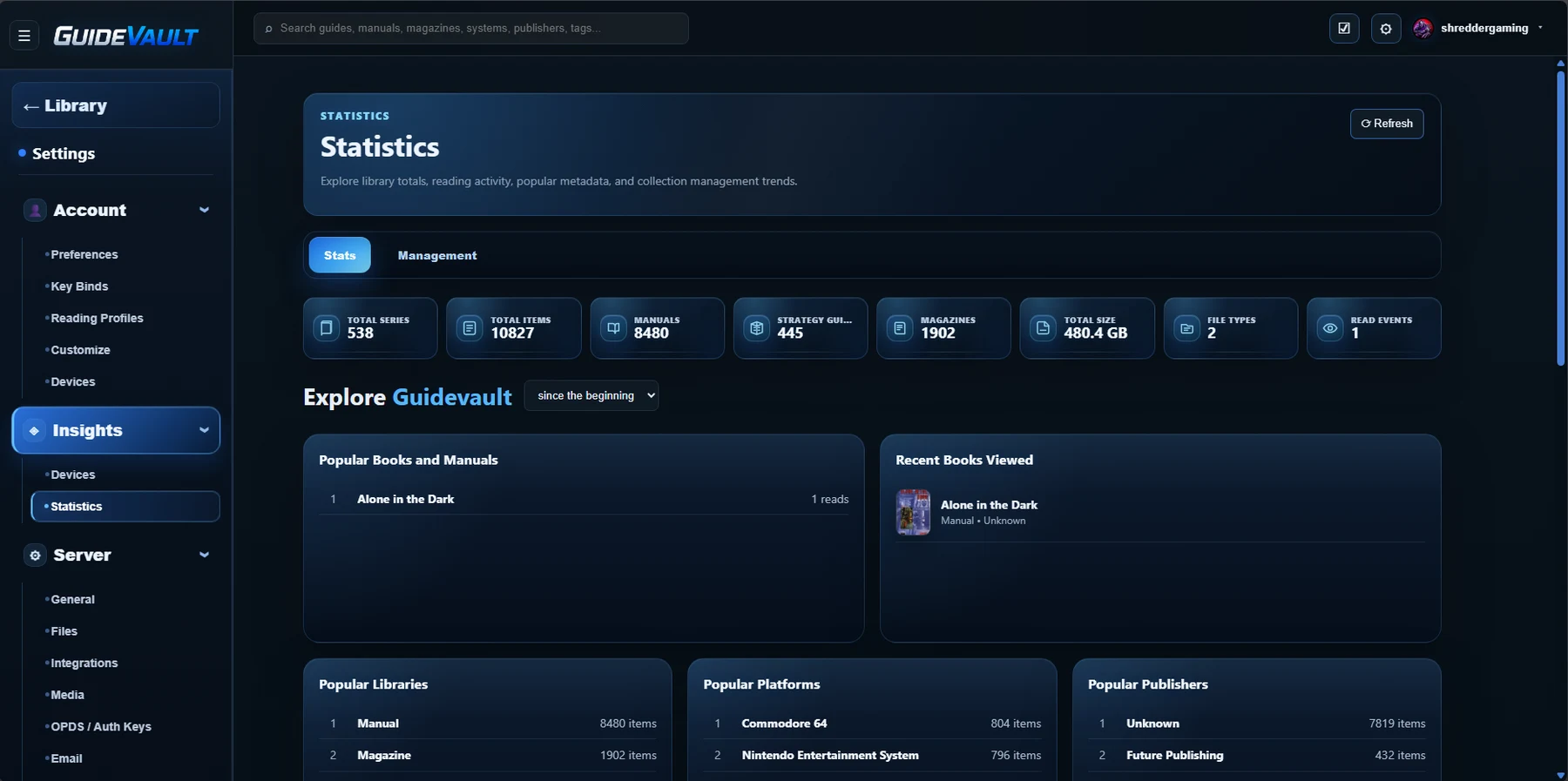
Top summary boxes
Section titled “Top summary boxes”The boxes at the top of the Stats tab are quick totals for the current GuideVault server. They help answer the immediate question: what is in this library right now?
Total Series
The number of detected series, publications, collections, or grouped names GuideVault can identify from the library metadata.
Total Items
The total number of indexed items across all content types.
Manuals
The number of items classified as manuals.
Strategy Guides
The number of items classified as strategy guides.
Magazines
The number of items classified as magazines.
Total Size
The combined storage size of all indexed files in the library.
File Types
The number of distinct file extensions or supported formats in the indexed library.
Read Events
The number of recorded reading/opening events tracked by GuideVault.
Time range selector
Section titled “Time range selector”The Stats tab can be filtered by time range. The selector can show data:
- Since the beginning — all data since the Docker instance and its persistent data were created.
- This year — data for the current calendar year.
- This month — data for the current month.
This is useful when you want to compare your full historical library activity against more recent reading or management activity.
Popular and recent sections
Section titled “Popular and recent sections”The Stats tab reads metadata from the item details stored in GuideVault. If metadata is missing, incomplete, or marked as Unknown, those values may appear in the popular metadata lists. Cleaning metadata will make these sections more useful.
Popular Books and Manuals
Shows the most-read or most-opened books/manuals based on recorded read events.
Recent Books Viewed
Shows items most recently opened in the reader. This helps you resume or verify recent activity.
Popular Libraries
Breaks the collection down by library/object type, such as Manual, Magazine, or Strategy Guide.
Popular Platforms
Shows which platforms have the most associated items, based on metadata assigned to the items.
Popular Publishers
Shows publisher values found in metadata. A large Unknown value usually means publisher metadata still needs cleanup.
Popular Decades
Groups items by decade from available year/date metadata. Unknown means the item does not have usable date metadata yet.
Popular Topics
Shows common topic/category metadata such as Manual, Controls, Magazine, Modes, or other detected terms.
Popular Formats
Shows the most common file extensions or supported document formats in the library.
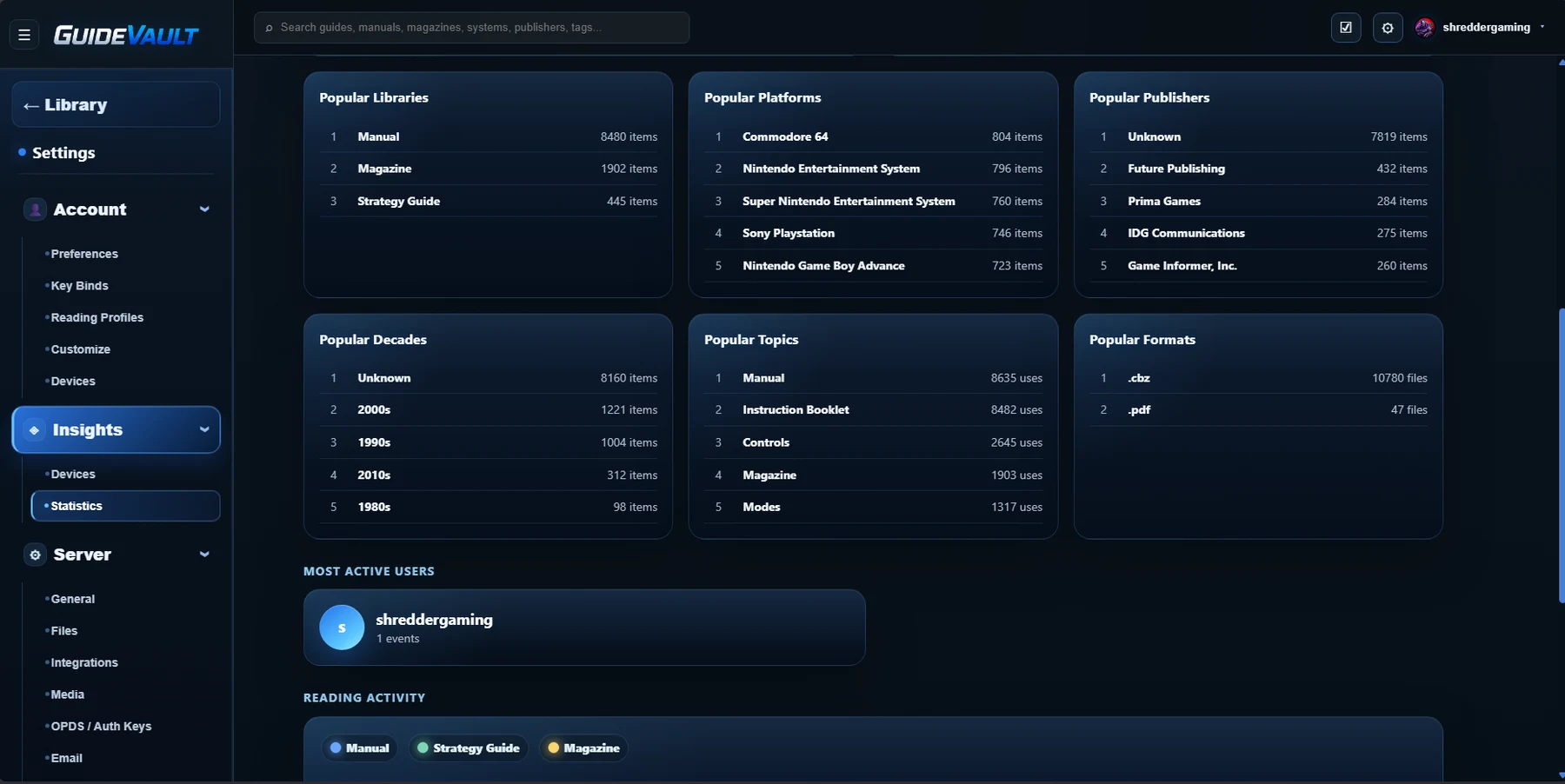
Most active users
Section titled “Most active users”The Most Active Users section shows which local GuideVault users have generated the most activity. This is based on recorded events, such as opening or reading items.
This is useful when multiple local profiles are used from different browsers or devices.
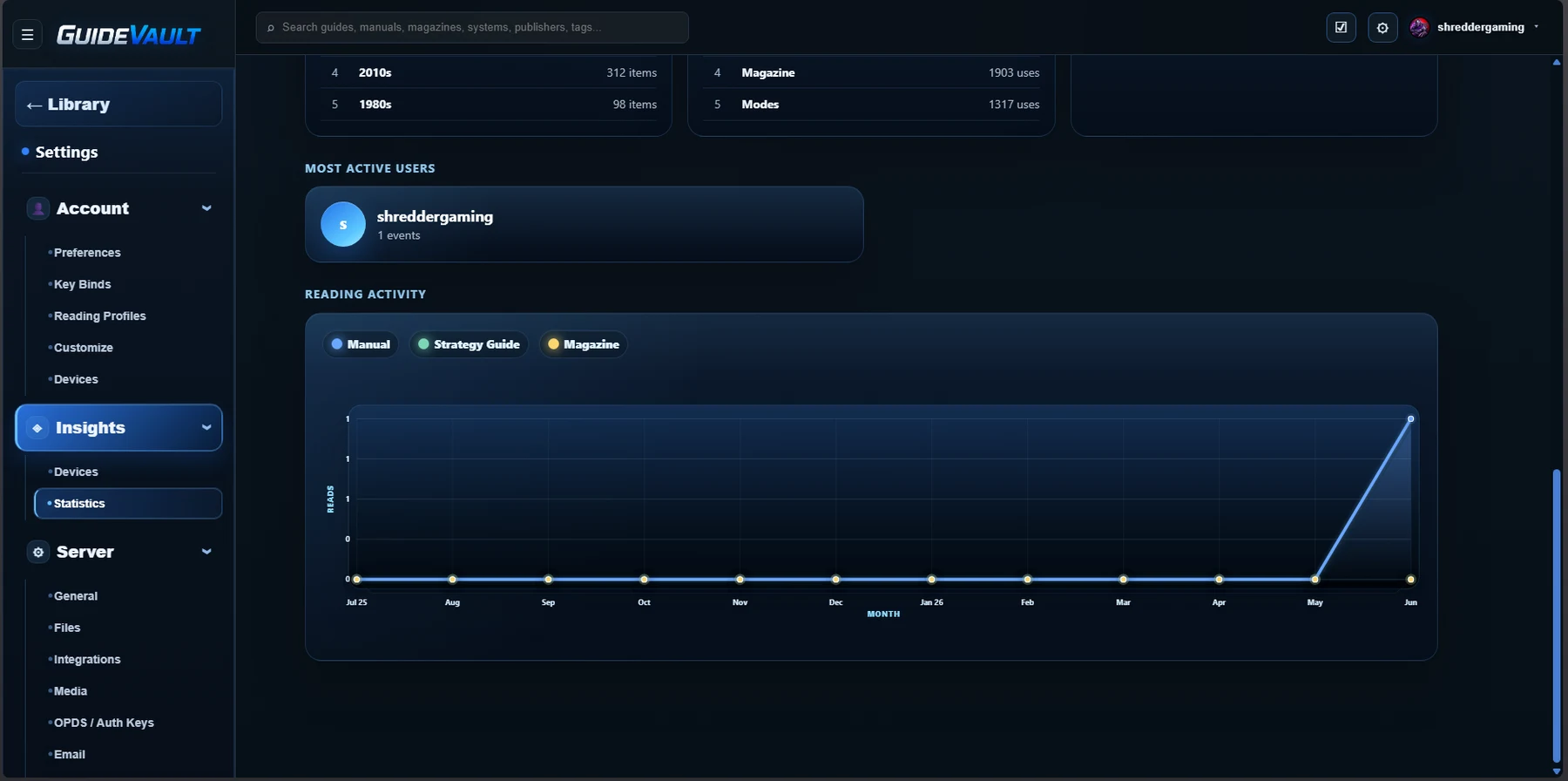
Reading activity
Section titled “Reading activity”The Reading Activity graph shows reading/opening events over a calendar-year view. It can break activity out by object type, such as:
- Manual
- Strategy Guide
- Magazine
This helps show whether the library is mostly being used for quick manual lookups, longer guide reading, magazine browsing, or a mix of all three.
Management tab
Section titled “Management tab”The Management tab focuses less on reading activity and more on library health. This is where you can review coverage, matching status, format distribution, storage usage, and file growth over time.
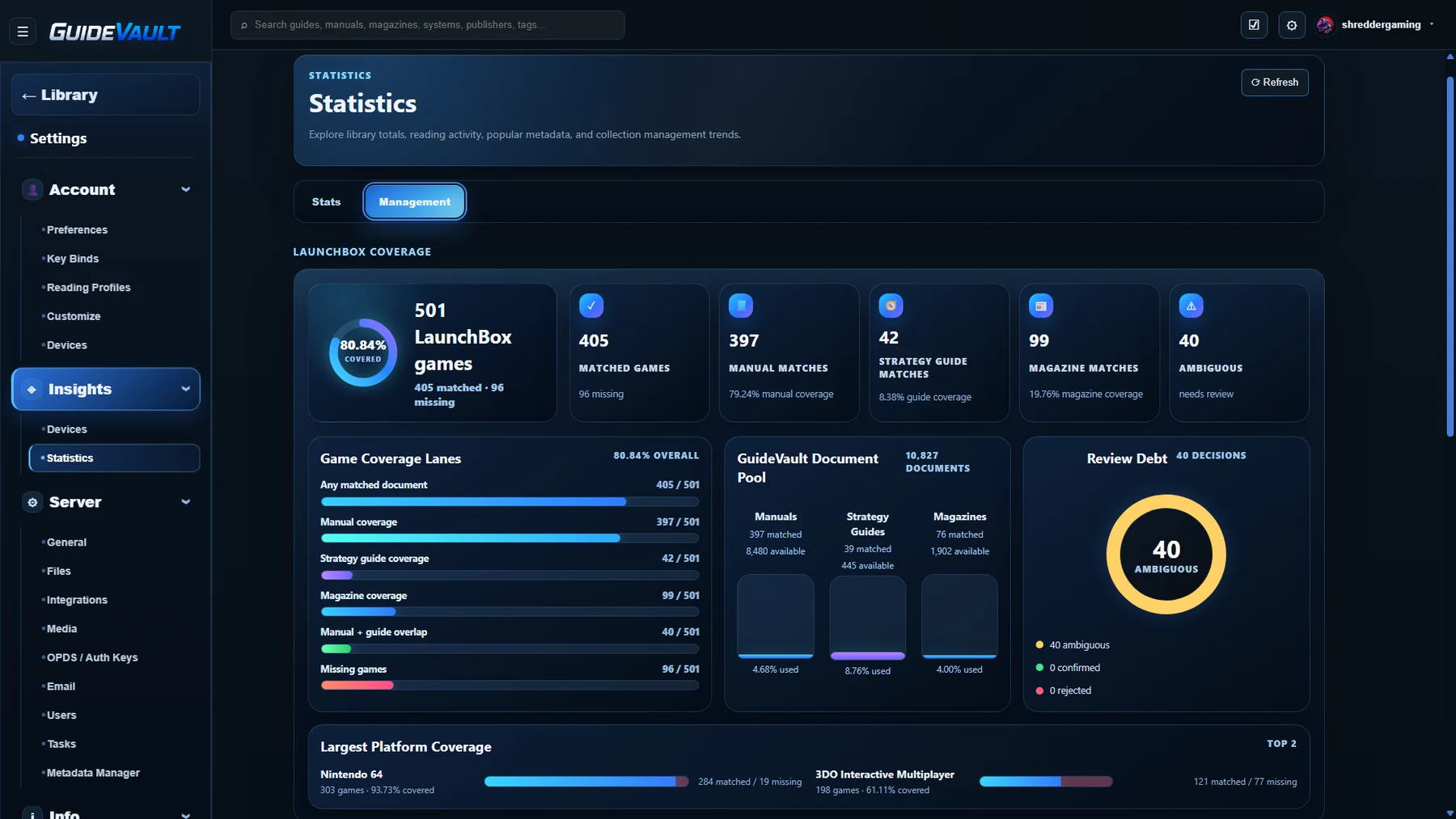
LaunchBox coverage
Section titled “LaunchBox coverage”LaunchBox coverage compares GuideVault documents against games detected from LaunchBox-related data. It is intended to help answer: how many games have useful documents attached to them?
LaunchBox Games
The number of games detected from LaunchBox data and the overall matched/missing count.
Matched Games
The number of games that have at least one related GuideVault document matched to them.
Manual Matches
The number of games with a matching manual. This is often the most important baseline coverage metric.
Strategy Guide Matches
The number of games with a matching strategy guide or walkthrough-style document.
Magazine Matches
The number of games with related magazine content, reviews, previews, or issue-based coverage.
Ambiguous
Items that may match but still need review because the relationship is not confident enough to treat as final.
Game coverage lanes
Section titled “Game coverage lanes”The Game Coverage Lanes area shows how much of the LaunchBox library has related GuideVault content.
Common lanes include:
- Any matched document — games with at least one related document of any type.
- Manual coverage — games with a manual match.
- Strategy guide coverage — games with a strategy guide match.
- Magazine coverage — games with magazine-related content.
- Manual + guide overlap — games that have both a manual and a guide.
- Missing games — games with no confirmed GuideVault document match.
These percentages help show where the library is strong and where it still needs documents or metadata cleanup.
GuideVault document pool
Section titled “GuideVault document pool”The GuideVault Document Pool compares the number of available documents against the number that are currently matched.
This is useful because a library may contain thousands of documents, but only a smaller portion may be connected to known games. A low usage percentage does not always mean the files are wrong. It may mean metadata, naming, platform matching, or LaunchBox association work is still needed.
Review debt
Section titled “Review debt”Review Debt is the number of items that still need a decision. These are documents or potential matches that need to be reviewed, confirmed, rejected, or cleaned up.
Review debt exists so matching is not treated as magic. GuideVault can suggest or detect relationships, but some items still need human confirmation to make sure manuals, guides, and magazines are properly matched to the right LaunchBox game.
Review states may include:
- Ambiguous — needs review before being trusted.
- Confirmed — reviewed and accepted as a valid match.
- Rejected — reviewed and determined not to be a valid match.
Largest platform coverage
Section titled “Largest platform coverage”The Largest Platform Coverage section highlights platforms with the most detected coverage. This can help identify where your library is already strong, such as a console platform with many matched manuals, and where it still has gaps.
Files added over time
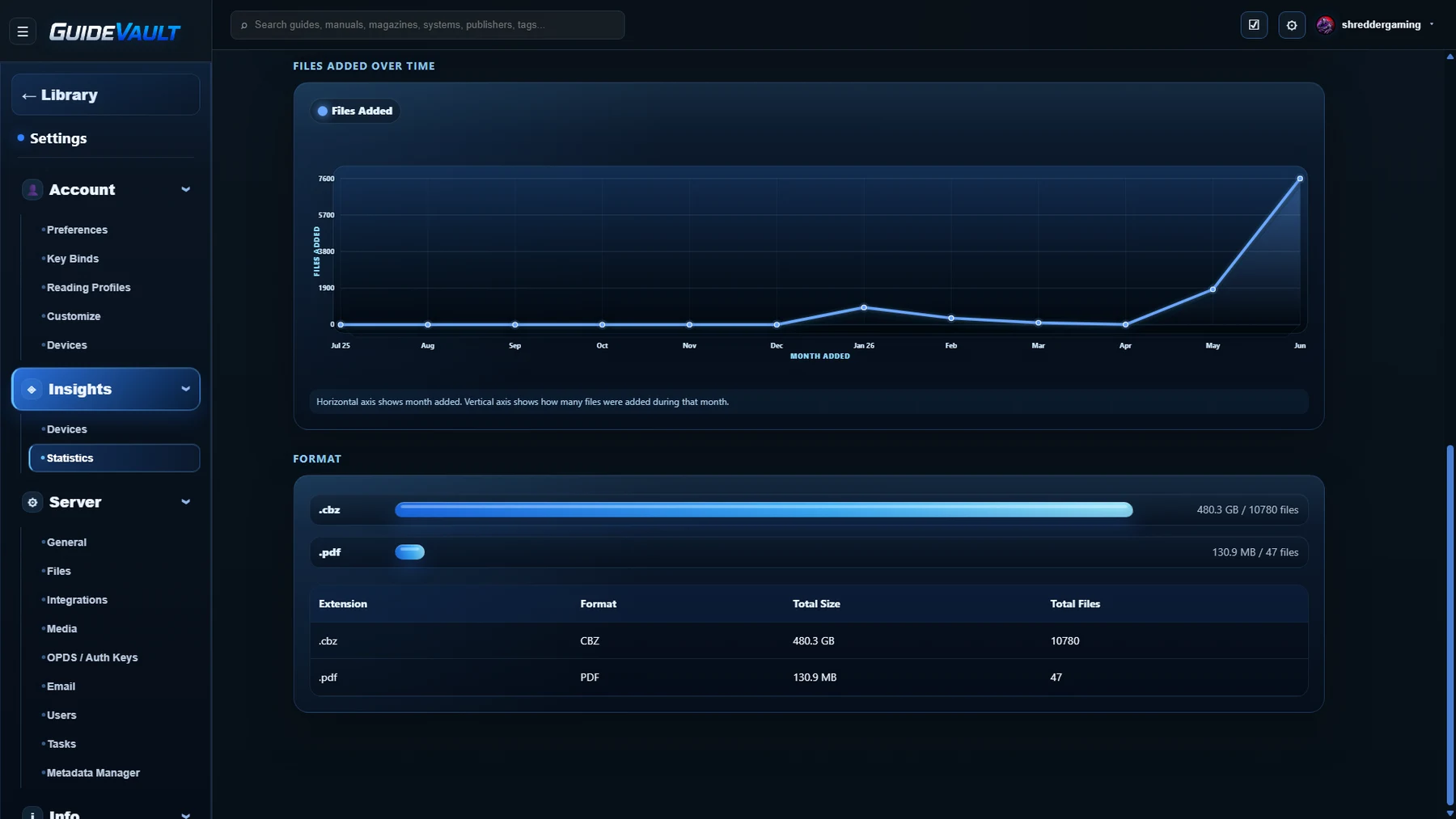
Section titled “Files added over time”The Files Added Over Time graph shows how many files were added during each month in a rolling calendar-year view.
This is not just a total count. It helps show import growth and library-building activity over time. For example, a spike may indicate a bulk import, metadata rebuild, or a large folder added to the watched library.
Format and storage breakdown
Section titled “Format and storage breakdown”The Format section shows all indexed files by file type, the amount of storage each type consumes, and how many files exist for each extension.
Examples include:
.cbz.cbr.pdf
This helps answer practical storage questions, such as whether most of the library size is coming from CBZ/CBR archives, whether PDFs are only a small part of the library, or whether a conversion/import workflow has created unexpected file types.
How to interpret the page
Section titled “How to interpret the page”Use the Stats and Management section as a library-health dashboard:
- If totals look wrong, check library folders and scan results.
- If many metadata values show as
Unknown, review metadata cleanup. - If LaunchBox coverage is low, review matching, platform names, and ambiguous items.
- If review debt is high, spend time confirming or rejecting proposed matches.
- If storage usage is unexpectedly high, check the Format section and file sizes.